
Include product details in alt text
Overview
SmartAlt can include product information in the alt text it generates for product images. From the Settings screen, you can choose whether SmartAlt should use the vendor name, the product title, and any specific metafields associated with the product.
This is useful when you want alt text to reflect the product data already stored in Shopify, instead of relying only on the image itself.
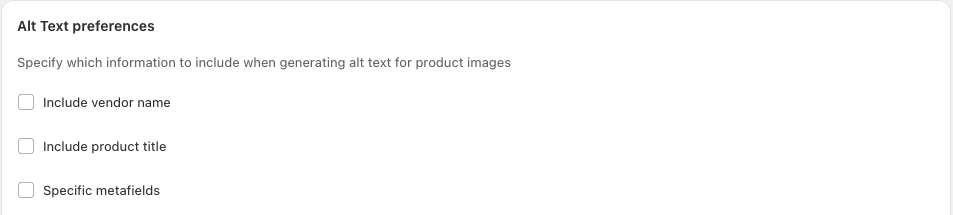
Where to find these settings
In your Shopify admin, open Apps → SmartAlt - AI Alt Text, then click Settings in the left-hand navigation. On the Settings page, scroll to the Alt Text preferences section.
In this section, SmartAlt shows these options:
Include vendor name
Include product title
Specific metafields
Choose what SmartAlt should include
Go to Apps → SmartAlt - AI Alt Text → Settings.
Scroll to the Alt Text preferences section.
Tick any of the following checkboxes, depending on what you want included in generated alt text:
Include vendor name
Include product title
Specific metafields
Click Save at the top of the page to apply the new preference.
What each option does
Include vendor name
When Include vendor name is selected, SmartAlt can use the product's vendor as part of the generated alt text. This is helpful if the brand or maker is important context for your catalog.
Include product title
When Include product title is selected, SmartAlt can pull wording from the product title into the generated alt text. This can help keep alt text aligned with how products are named in your store.
Specific metafields
When Specific metafields is selected, SmartAlt can use content from selected product metafields as part of generation. This is useful when important descriptive details are stored in metafields rather than in the title.
If you want SmartAlt to include custom product attributes such as material, style, finish, or other catalog-specific details, Specific metafields is the best option.
Using multiple options together
You can select more than one option in Alt Text preferences. For example, SmartAlt can use both the product title and the vendor name, or combine those with Specific metafields.
This gives you more control over how much product context is included in generated alt text.
Best practices
Use Include product title if your product titles are clear and descriptive.
Use Include vendor name when brand information matters to shoppers.
Use Specific metafields for product details that are not consistently included in titles.
Review your Alt text character limit if you enable several options at once.
Frequently asked questions
Yes. In Alt Text preferences, you can select any combination of Include vendor name, Include product title, and Specific metafields.
Yes. After updating the checkboxes in Alt Text preferences, click Save at the top of the Settings page.
If SmartAlt shows No metafield definitions found, your Shopify product metafield definitions may not be set up yet. Create them in Shopify first, then return to SmartAlt.